• December 14, 2025
  • Apple
    Apple

    Apple’s iPhone Fold Will Offer A Huge Boost To Foldable Display Makers

    F1: The Movie Is Now Streaming To Apple TV Subscribers

    Jailbreak iOS 26.2: Everything We Know So Far

  • Google
    Google

    Google’s First AI Smart Glasses Will Debut In 2026

    Google’s Latest Pixel Ad Mocks Apple’s iPhone With A Wicked Twist

    Apple’s AirDrop Now (Sort Of) Works With Android Phones

  • Microsoft
    Microsoft

    Get Microsoft Windows 11 And More For Just $14 With These Christmas Microsoft Software Deals

    Apple Is Breaking Sales Records Thanks To The iPhone 17

    10 Best Black Friday Deals Still Available And Worth Checking Out

  • Tesla
    Tesla

    Tesla’s 2025 Holiday Software Update Is Now Rolling Out

    Tesla Might Add CarPlay, But Android Users Could Be Left Out

    Tesla Launches $36K Model 3, $39K Model Y

  • Reviews
    Reviews

    VideoProc Converter AI Helps Restore Old Videos Up To 4K [Review]

    Why Choose CZUR StarryHub For Meeting Solution?

    Stellar Repair For MS SQL – Product Review

  • Deals
    Deals

    Enjoy VR Gaming With $100 Off This PlayStation VR2 Headset Today

    The Fan-Favorite Dyson Airwrap Hair Multi-Styler Is 26% Off, Now $479 Only

    Save 30% Off This 2.5L LEVOIT Top Fill Bedroom Humidifier For Limited Time

Reading
How to enable Administrator account in Windows 7
ShareTweet
Anum Lodhi·August 16, 2009

How to enable Administrator account in Windows 7

Remember the Administrator account that was present in good old Windows XP days? The master Administrator account is not visible by default in Windows 7 or Vista.

However there is a simple way to enable it..

This account has complete access and permissions on the computer. It may be useful when you are in need of some serious troubleshooting.

The simple steps to enable and disable the master Administrator account in Windows 7 are as follows:

Enable the Administrator account:

Step 1: Open the command prompt in administrator mode

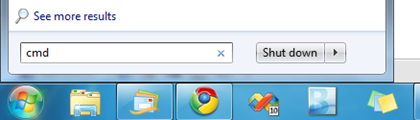
  • Type ‘cmd’ in the start menu search box:
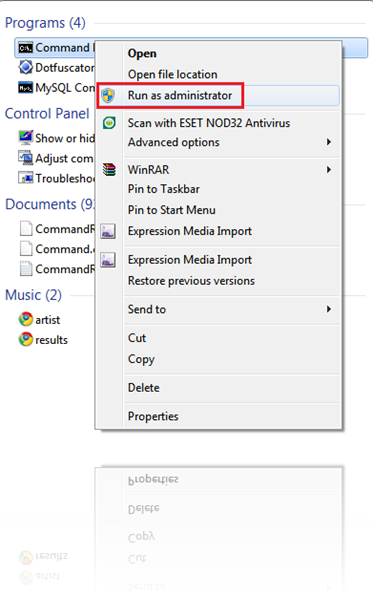
  • Right click on the Program ‘cmd’
  • Select “Run as administrator”:

Step 2: In Command Prompt:

  • Type in the command ‘net user administrator /active:yes’
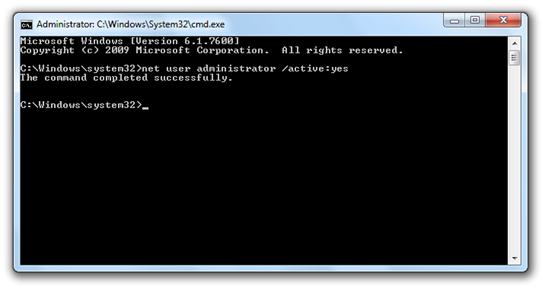
 Windows 7 Cmd

And you are done ! 😀

Logoff and login again and you will now see an option for Administrator login!
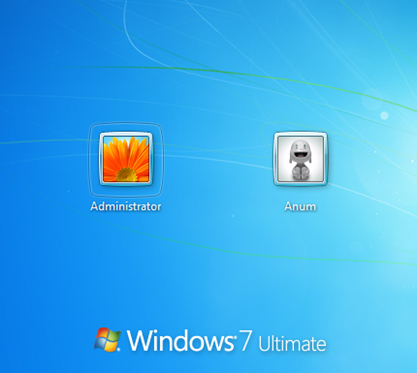
Administrator Account in Windows 7 Ultimate

Note: It is advisable to create a strong password for this account.

Disable the Administrator account:

  • Login with your current user account.
  • Open the command prompt in the administrator mode as in Step 1.
  • Type in the command ‘net user administrator /active:no’
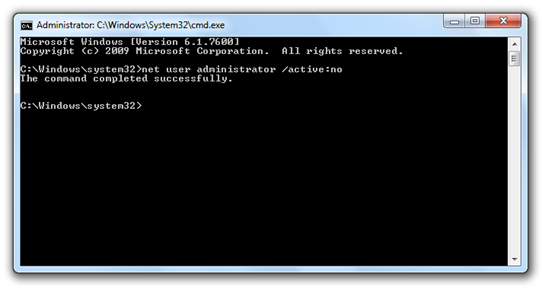
Windows 7 Cmd

And you are done!

Tags
Administrator account in Windows 7Windows 7Windows 7 CenterWindows 7 RTM
ShareTweetSubmitShare
Anum Lodhi
Anum is a student of Software Engineering.
Previous Cover Flow in Windows 7 Media Center
Next Windows 7 DVD Covers
Show Comments (4)

TRENDING NOW

Apple’s iPhone Fold Will Offer A Huge Boost To Foldable Display Makers

F1: The Movie Is Now Streaming To Apple TV Subscribers

Jailbreak iOS 26.2: Everything We Know So Far

iPadOS 26

Download: Apple Releases Final Versions Of iPadOS 26.2, macOS 26.2, tvOS 26.2, watchOS 26.2, visionOS 26.2

Download: iOS 26.2 Final OTA Update And IPSW Links Out Now

2026 Porsche Cayenne And Macan Support For Apple Digital Keys Nears

Apple Releases Second RC Of iOS 26.2 To Testers

Apple’s New F1 Streaming Deal Previewed As 2025 Season Draws To A Close

Mac Users Can Get Christmas-Ready Lights And Snow To Their Mac With This App

Apple’s Hypertension, Sleep Apnea, And Hearing Health Features Come To New Countries

FOR YOU

iPhone 17 Pro Max Gets Thicker, While iPhone 17 Air Goes Ultra-Thin

iOS 26

Download: iOS 26 Beta 8 OTA Profile, IPSW Links Out For iPhone

iPhone 17 Pro To Keep Triangular Camera Layout But Aluminum Camera Bump Expected

iOS 26 Download Day Release Time In Your Region Time Zone

The iPhone 17 Could Bring 8K Video Recording To Apple Devices For The First Time

HomeKit In iOS 26 Is Adding New EnergyKit Framework

The iPhone 17 Dynamic Island Is Not Getting Smaller

iOS 26 watchOS tvOS macOS visionOS iPadOS

iOS 26 Final Version Release Date Has Been Announced

  • About
  • Advertise
  • Privacy Policy
  • Tip Us
Copyright © 2008-2025 Redmond Pie. All Rights Reserved.
  • About
  • Advertise
  • Privacy Policy
  • Apple
  • Google
  • Microsoft
  • Tesla
  • Reviews
  • Deals
Start typing to see results or hit ESC to close
Apple iPhone deals iPad Android
See all results

SUBSCRIBE

Join 100k+ other tech lovers and get the latest news in your inbox
[mc4wp_form id="389"]