
• December 20, 2025
  • Apple
    Apple

    Hypertension Notifications Have Been Approved For Australian Apple Watches

    iOS 26.2 Battery Life Drain Performance Tested

    Apple Released A New Open-Source 2D To 3D Photo Model

  • Google
    Google

    Google’s First AI Smart Glasses Will Debut In 2026

    Google’s Latest Pixel Ad Mocks Apple’s iPhone With A Wicked Twist

    Apple’s AirDrop Now (Sort Of) Works With Android Phones

  • Microsoft
    Microsoft

    iOS 26.2 Features A New AirDrop Privacy Feature

    Get Microsoft Windows 11 And More For Just $14 With These Christmas Microsoft Software Deals

    Apple Is Breaking Sales Records Thanks To The iPhone 17

  • Tesla
    Tesla

    Tesla’s 2025 Holiday Software Update Is Now Rolling Out

    Tesla Might Add CarPlay, But Android Users Could Be Left Out

    Tesla Launches $36K Model 3, $39K Model Y

  • Reviews
    Reviews

    VideoProc Converter AI Helps Restore Old Videos Up To 4K [Review]

    Why Choose CZUR StarryHub For Meeting Solution?

    Stellar Repair For MS SQL – Product Review

  • Deals
    Deals

    This Elegoo Centauri Carbon 3D Printer Is $80 Off With Pre-Christmas Delivery

    Get A Big $250 Discount On Apple’s Latest M5-Powered MacBook Pro

    Get A Free Pair Of Sony ANC Earbuds With These $248 WH-1000XM5 Headphones

Reading
How To Add Glowing Apple Logo To iPhone 7 [Video]
ShareTweet
Oliver Haslam·October 29, 2016

How To Add Glowing Apple Logo To iPhone 7 [Video]

Want to install a glowing Apple logo mod on your iPhone 7 or iPhone 7 Plus? The good news is that you can, and the video below details on how to do it.

Apple’s newly announced MacBook Pros are great-looking machines, but there is one thing that is missing – the glowing Apple logo on the back. We have become accustomed to that logo shining a light for a long time now, and while some Mac models have seen it die a death, the MacBook Pro saw the light live on. Until Apple’s new MacBook Pros were announced yesterday.
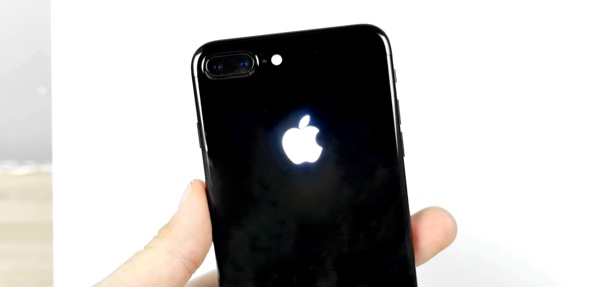
iPhone 7 apple logo glowing mod

There’s one place that many people have long wished Apple would add the glowing logo though, and that’s the iPhone. Rumors of glowing Apple logos on iPhones have been around for far too long, and while it’s possible Apple has toyed with the idea of doing such a think in the past, we have never seen one actually made. Well, that’s not strictly true actually.

While Apple itself hasn’t made an iPhone with a glowing logo, that hasn’t stopped third-parties from giving it a try, and we now have video of an iPhone 7 Plus getting the glowing treatment, and it looks gorgeous.

The video shows a Jet Black iPhone 7 Plus being taken to a specialist in Washington in order to have the modification carried out and while the process is not for the faint of heart – it takes four LEDs from a donor iPhone 6 and a matter of hours to carry out – the end results cannot be argued with. A Jet Black iPhone 7 with a glowing white Apple logo is a thing of beauty. And we want one.

But alas, taking an iPhone 7 to Washington is the first hurdle, and then you have to deal with any potential issues that arise from the work. Namely, you’ll have no warranty. While that may not bother some, when we’re talking about a Jet Black iPhone these things are far from cheap to replace if something goes wrong.

Bear that in mind when deciding how much you want that glowing logo!

(source: EverythingApplePro [YouTube])

You may also like to check out:

  • Add Glowing Backlit Apple Logo To iPhone 6 / 6s Or 6 Plus / 6s Plus, Here’s How
  • The Best iPhone 7 And 7 Plus Screen Protectors
  • The Best iPhone 7 / iPhone 7 Plus Cases
  • Best iPhone 7 Bluetooth Wireless Headphones For Under $50

You can follow us on Twitter, add us to your circle on Google+ or like our Facebook page to keep yourself updated on all the latest from Microsoft, Google, Apple and the Web.

Tags
AppleApple LogoiPhone 7iPhone 7 PlusiPhone accessories
ShareTweetSubmitShare
Oliver Haslam
Oliver Haslam has written about technology for over a decade. His work has been published in print at Macworld and online pretty much everywhere else. If it plugs in or has a battery, it's fair game.
Related

Hypertension Notifications Have Been Approved For Australian Apple Watches

Oliver Haslam·December 19, 2025

iOS 26.2 Battery Life Drain Performance Tested

Oliver Haslam·December 18, 2025
Previous Touch Bar In MacBook Pro Runs eOS, A Variant Of watchOS, And Is Powered By Apple T1 Chip
Next Survey Claims Half Of Galaxy Note 7 Users Switching To iPhone
Show Comments (4)

TRENDING NOW

Hypertension Notifications Have Been Approved For Australian Apple Watches

iOS 26.2 Battery Life Drain Performance Tested

Apple Released A New Open-Source 2D To 3D Photo Model

ChatGPT’s Apple Music Limited Integration Goes Live

Apple Reportedly Working On A New iMac Pro With An M5 Max Chip Inside

iOS 26.2 Features A New AirDrop Privacy Feature

New iOS 26.4 and iOS 27 Features Have Leaked Ahead Of Release

Kodi 21.3 Omega Final APK Android Download And iOS IPA, Along With Windows And Mac Version, Out Now

Download: iOS 26.3 Beta 1 Released Alongside iPadOS 26.3, macOS 26.3, tvOS 26.3, watchOS 26.3, visionOS 26.3

Apple Car Keys Support Is Coming To Some Toyota Vehicles

FOR YOU

How To Downgrade iOS 26 To iOS 18.7 / 18.6.2

Base iPhone 17 Could Get A18 Chip And 8GB RAM From iPhone 16, Says Report

iOS 26 Beta 2 Download Expected Release Date

Testing Shows iPhone 17’s N1 Chip Boosts Wi-Fi 7 Speeds

iOS 26 Wallet Boarding Pass Live Activity Is Supported By 10 Airlines At This Time

iPhone 17 Is Likely To Be Unveiled The Week Of September 8

iOS 26

These 8 iOS 26 Features Will Work On iPhone 15 Pro And Newer Only

HomeKit In iOS 26 Is Adding New EnergyKit Framework

  • About
  • Advertise
  • Privacy Policy
  • Tip Us
Copyright © 2008-2025 Redmond Pie. All Rights Reserved.
  • About
  • Advertise
  • Privacy Policy
  • Apple
  • Google
  • Microsoft
  • Tesla
  • Reviews
  • Deals
Start typing to see results or hit ESC to close
Apple iPhone deals iPad Android
See all results

SUBSCRIBE

Join 100k+ other tech lovers and get the latest news in your inbox
[mc4wp_form id="389"]